Atomic Insights #3: LinkedIn Profile Optimisation in 2026 - Why 360Brew Is Judging Your Profile (and How to Pass)
When was the last time you actually looked at your own LinkedIn profile - as a prospect would?
I don't mean a quick glance. I mean:
You receive a connection request from someone you've never met. You click their name. In 3.2 seconds, you decide whether to Accept or Ignore.
Now flip it around. That's what every single prospect is doing when your connection request lands in their inbox.
Here's the uncomfortable truth I've been seeing across hundreds of campaigns at Atomic BI: the #1 reason outreach fails isn't the message, it's the profile behind it.
Your profile isn't a resume. It's a landing page. And in 2026, it's being read by both humans and AI.
That's why we created Atomic Insights - weekly, actionable tips proven to work from our own campaigns and our users' results.
In Atomic Insights #1, we covered the new rules of LinkedIn Connections. In Atomic Insights #2, we broke down how Comments have become a more powerful growth engine than Posts.
Today, we're going back to the foundation that makes both of those strategies work: your LinkedIn profile itself.
If your connections strategy is the engine and your comments are the fuel, your profile is the chassis. Get it wrong, and nothing else matters.
Let's fix that.
1. YOUR PROFILE IS A LANDING PAGE (NOT A RESUME)
LinkedIn profile optimisation in 2026 starts with a mindset shift: your profile is a conversion asset, not a career history.
Think about it this way. When a prospect receives your connection request, they see your name, photo, headline, and mutual connections. If they're curious enough, they click through to your full profile.
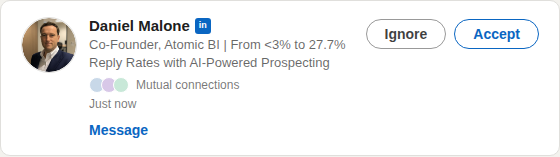
That click is the equivalent of a website visit. And just like a landing page, your profile needs to answer three questions in seconds:
- Can I trust this person?
- Can they help me?
- What should I do next?
If your profile reads like a resume (listing job titles and responsibilities), you're essentially showing your prospect a terms-and-conditions page instead of a sales page.
FACT: LinkedIn "All-Star" profiles (100% complete) are 40x more likely to receive opportunities than incomplete profiles.
And here's the part most people miss: in 2026, LinkedIn's AI model 360Brew doesn't just surface your profile to search results. It cross-references your entire profile against your content and engagement patterns to calculate a Profile Coherence Score.
If your headline says "B2B Sales Leader" but you're posting about productivity hacks and tagging motivational quotes, 360Brew flags the misalignment - and throttles your visibility.
Your profile, your posts, and your outreach all need to tell the same story.
Atomic Action Steps:
- Open your profile right now and read it as if you're a cold prospect who just received your connection request. Does it answer the three questions above?
- Audit for coherence: Does your headline match the topics you post about? Do your skills match the problems you solve?
- Remove any "resume language" (job descriptions, responsibilities) and replace it with outcomes and value statements.
2. HEADLINE + PHOTO: YOUR 3.2-SECOND AUDITION
Your profile photo and headline are the two most visible elements on LinkedIn - they appear every time you post, comment, send a connection request, or show up in search results.
In Article #1, we touched on how your headline is the single most important piece of real estate for connection acceptance rates. Now let's go deeper.
FACT: Profiles with professional headshots receive 14x more profile views and 36x more messages than those without.
Profile Photo Best Practices (2026):
- Your photo should be a professional headshot - not a vacation pic, not a group photo, not a logo.
- Face should occupy roughly 60% of the frame.
- High resolution (minimum 400x400px).
- Good lighting, neutral or slightly warm background, and an approachable expression.
Don't Forget the Banner:
Your Banner Image is the most overlooked visual on LinkedIn. 70% of users leave it blank.
This is free billboard space - use it to reinforce your value proposition, showcase your company, or display a client result (even better, if you're a LinkedIn Premium subscriber you can add up to 5 banners and showcase multiple).
Headline Formula for B2B Sales Professionals:
You have 220 characters. Don't waste them on just a job title.
Use this formula: {Role} @ {Company} | {Quantified Result or Proof Point} | {Who You Help + Outcome}
Example: "Co-Founder @ Atomic BI | 17%+ Response Rates for B2B Teams | AI-Powered LinkedIn Outreach That Books Meetings"
Pro Tip: Your headline is also a primary SEO field. 360Brew indexes it for search matching. Include 2-3 keywords your ideal prospects would search for.
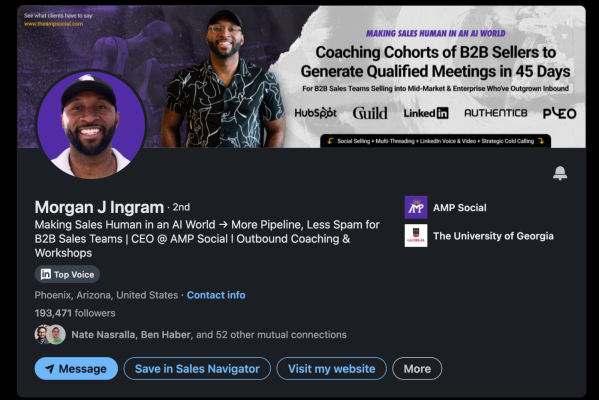 Here's a great example of an excellent "above the fold" profile setup
(Credit: https://www.linkedin.com/in/morganjingramamp)
One creator reported that restructuring their headline from a generic job title to a keyword-rich value headline increased their search appearances from 25 to 240 per week, in just three weeks!
Atomic Action Steps:
- Rewrite your headline using the formula above. Include at least one specific metric or result.
- Upload a professional headshot (60% face, good lighting, high-res).
- Design a banner image that reinforces your value proposition (super easy with AI + Canva nowadays). Dimensions: 1584x396px.
- Check your headline includes 2-3 keywords your target prospects would use when searching LinkedIn.
3. THE ABOUT SECTION: YOUR CONVERSION COPY
Your About section is where curiosity converts to action. It's the first place people scroll to after your headline hooks them.
Most professionals write their About section like an autobiography. In 2026, the highest-converting About sections read like sales copy: structured, scannable, and ending with a clear CTA.
The 5-Part About Section Framework:
- Hook (1-2 lines): State the problem your ideal prospect faces, or lead with your strongest result.
- Who you help (1-2 lines): Be specific about your target audience and the outcome you deliver.
- Proof points (3-5 lines): Quantified results, client wins, or specific capabilities - use bullet points.
- Credibility marker (1-2 lines): Brief background that establishes why you're qualified.
- CTA (1-2 lines): Tell the reader exactly what to do next: book a call, DM you, visit your site.
Pro Tip: LinkedIn's 360Brew scans your About section as a primary signal for "Topic Authority" scoring. Keywords you use here directly influence which searches surface your profile and how your content gets distributed.
Most B2B sales professionals skip the CTA entirely. But think about it: if someone reads your entire About section, they're already interested. Don't make them guess what to do next.
Atomic Action Steps:
- Rewrite your About section using the 5-part framework above.
- Include at least 3 quantified proof points (response rates, revenue generated, time saved, etc.)
- End with a specific CTA - "Book a 15-minute call: [link]" or "DM me 'outreach' and I'll send you a case study."
- Add 3-5 keywords your prospects would search for naturally within the text.
4. THE FEATURED SECTION: LINKEDIN'S MOST UNDER-UTILISED REAL ESTATE
I teased this one back in Article #1; now it's time to deliver!
The Featured Section sits right below your About section and above your Activity feed. It's prime visual real estate that most profiles leave completely empty.
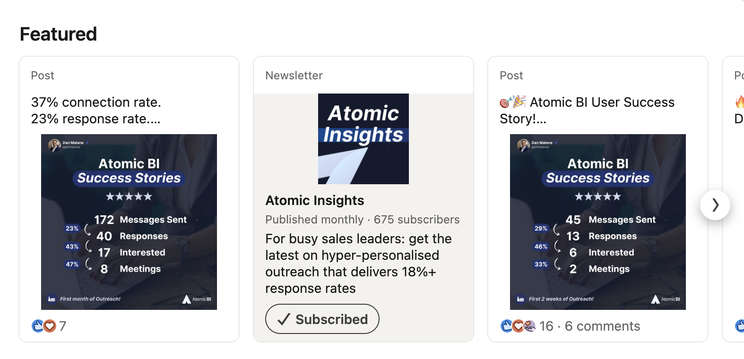
Think of it as your "portfolio shelf." While your About section tells prospects what you do, the Featured Section shows them.
FACT: The Featured Section is one of the most powerful yet underused parts of a LinkedIn profile.
It allows you to pin posts, articles, links, and media that prove your expertise - yet the majority of B2B professionals don't use it at all.
What to Feature (for B2B sales professionals):
- A case study or client result - link to a published case study on your website, or pin a post that tells a client success story.
- A lead magnet or resource - link to a free guide, ROI calculator, or tool that provides immediate value. (We link to our How It Works page and Case Studies.)
- Your best-performing LinkedIn post - the one with the most engagement and saves. This acts as social proof.
- A short video or product demo - visual content stops the scroll. Even a 60-second explainer can make a huge impact.
Why This Matters for 360Brew:
360Brew evaluates Profile Coherence - the alignment between your stated expertise and your actual content. A well-curated Featured Section reinforces that coherence signal by connecting your profile positioning to tangible proof.
It's also the first thing prospects see after reading your headline and About section.
For outbound campaigns, it's obvious that profiles with a curated Featured Section would see higher connection acceptance rates. Prospects feel like they're engaging with a real professional, not a faceless outreach account.
Atomic Action Steps:
- Add at least 3 items to your Featured Section this week.
- Lead with your strongest proof point - a case study, client testimonial, or data-backed post.
- Include one resource that provides value to your prospect (guide, calculator, free tool).
- Reorder items so the most compelling one appears first (left position).
5. EXPERIENCE, SKILLS & SSI: THE SIGNALS THAT COMPOUND
We've covered the "above the fold" sections. Now let's talk about the sections that quietly compound your profile's algorithmic strength.
Experience Section:
Your Experience section shouldn't just be a CV. It's a credibility engine.
360Brew, recruiters, and prospects all scan this section for signals of competence. But here's the difference between a forgettable entry and a compelling one:
❌ "Managed a team of 10 SDRs and oversaw pipeline generation."
✅ "Scaled SDR team from 3 to 10 reps, growing pipeline from $1.2M to $4.8M in 12 months. Implemented AI-assisted outreach that cut prospecting time by 79% per rep."
The second version tells a story with numbers. It's also more likely to be indexed by 360Brew as a signal of genuine expertise.
Skills & Endorsements:
LinkedIn allows up to 50 skills, but quality beats quantity. Here's what matters:
- Pin your top 3 skills - choose the ones most relevant to your target audience. These appear prominently on your profile.
- Remove generic skills - "Microsoft Office" and "Team Player" don't cut it.
- Endorsements act as social proof: ask 5-10 colleagues or clients to endorse your top skills this week. Each endorsement strengthens 360Brew's confidence in your claimed expertise.
LinkedIn's Social Selling Index (SSI) scores your profile across four pillars, and the first pillar, "Establishing Your Professional Brand," is directly tied to profile completeness and content quality.
Users with an SSI above 70 see 78% more profile views than those below 50!
Final note - Creator Mode, on or off?
Quick take: if you're focused on outbound sales and want prospects to connect with you, keep Creator Mode off. Creator Mode replaces your "Connect" button with a "Follow" button, which adds friction to the exact action you want prospects to take.
If you're building a personal brand and prioritise content reach over connection requests, Creator Mode gives you access to better analytics and a Follow-first experience. But for most B2B sales professionals doing outbound, the default Connect button is more valuable.
Atomic Action Steps:
- Rewrite your current role's Experience entry using the outcomes-focused format above. Include at least 2 specific metrics.
- Review your Skills: pin your top 3, remove generics, and ask 5 colleagues to endorse your priority skills.
- Check your SSI score at linkedin.com/sales/ssi - aim for 70+.
- If you're doing outbound sales, turn Creator Mode off so prospects see the Connect button.
FREQUENTLY ASKED QUESTIONS
- How does LinkedIn's 360Brew algorithm evaluate my profile in 2026?
360Brew is LinkedIn's 150-billion-parameter AI model that assesses your profile across four alignment pillars: Profile Coherence (does your headline, About, and Skills match your content?), Content Consistency (do you post regularly in your stated area of expertise?), Network Relevance (does your audience actually engage with your topics?), and Engagement Patterns (are people saving, sharing, and meaningfully commenting on your content?). A strong profile is the foundation - without Profile Coherence, 360Brew throttles your content distribution regardless of post quality.
- What is a good LinkedIn SSI score for B2B sales professionals in 2026?
The average LinkedIn SSI score sits around 35-40. A score of 70 or above puts you in the top tier, unlocking 78% more profile views, higher content distribution, and expanded outreach limits (up to 250 connection requests per week). You can check your SSI score for free at linkedin.com/sales/ssi. The first pillar - "Establishing Your Professional Brand" - is directly improved by completing and optimising all profile sections.
- Should I use LinkedIn Creator Mode for B2B sales outreach?
For most B2B sales professionals focused on outbound prospecting, Creator Mode should be turned off. Creator Mode replaces the "Connect" button with a "Follow" button, adding friction to the connection request workflow that is essential for cold outreach. Creator Mode is better suited for professionals who prioritise content reach and personal brand building over direct connection-based outreach.
- What should I put in my LinkedIn Featured Section?
The Featured Section should contain 3-4 items that prove your expertise and provide value: a case study or client result, a lead magnet or free resource (ROI calculator, guide), your highest-performing LinkedIn post, and a short product demo or explainer video. This section is prime visual real estate that sits directly below your About section and significantly impacts prospect trust and connection acceptance rates.
- How do I optimise my LinkedIn headline for search in 2026?
Use a value-driven formula rather than just a job title. Structure: {Role} @ {Company} | {Quantified Result} | {Who You Help + Outcome}. Include 2-3 keywords your ideal prospects would search for, as 360Brew indexes your headline as a primary search matching field. LinkedIn gives you 220 characters - use them all to communicate value, not just status.
CHECKLIST: YOUR PROFILE OPTIMISATION ROADMAP
Complete this week:
- Rewrite your headline using the value-driven formula (include 2-3 search keywords)
- Upload a professional headshot (400x400px minimum, face = 60% of frame)
- Design and upload a banner image (1584x396px)
- Rewrite your About section using the 5-part framework (hook → audience → proof → credibility → CTA)
- Add 3+ items to your Featured Section (case study, resource, top post, video)
- Rewrite your current Experience entry with outcomes and metrics
- Pin your top 3 skills; remove generic ones; request 5+ endorsements
- Check your SSI score at linkedin.com/sales/ssi - set a target of 70+
- Turn Creator Mode off if you're focused on outbound sales
- Audit your profile for coherence: headline, About, Skills, and posts should all tell the same story
And that's it! Leave your questions in the comments below, and share this with anyone who needs it. See you in 2 weeks for more Atomic Insights!
Want to see how AI-powered LinkedIn outreach actually works - with 13-27% response rates and messaging that sounds like you, not a bot? Book a call and we'll show you.
